Your ISP (Internet Service Provider), whether it is a dial-up or cable company or phone company, has a very high-capacity trunk line tied into the internet.
If you have a dial-up connection, your ability to tap into that high capacity is limited by the amount of data your telephone line can handle. You may have a 56K modem, but our phone lines in Isabella will only give you about 24k throughput. (This was written in 1999.)
Digital cables used by phone companies and cable companies have a much, much higher capacity than a regular (analog) telephone line, so when you use these high-capacity lines, web pages pop up onto the screen almost instantly. You can download big MP3 and picture files in a flash. You can watch videos over the internet. None of this is possible with dial-up in Isabella.
If every customer stayed connected to the Web all day, a dial-up ISP would need a separate phone line (and modem) for each customer, which would be prohibitively expensive. Therefore, they usually don't allow you to stay on 24/7.
With cable and DSL, you don't have to make a new connection each time you want to access the Internet, so not only do you not have to put up with busy signals, etc., but you are actually connected all the time, whether you have a web browser or email program running or not.
Dial-up internet modems are known to lose connection from time to time, sometimes frequently. Sometimes followed by busy signals when you try to reconnect. Again, with cable and DSL, loss of connection should rarely be a problem.
Given the many advantages of cable, the only reason NOT to choose cable modem over dial-up is the higher cost, so let's look at that:
2008 Update: I originally had an analysis here showing that high-speed cable Internet (and later, DSL) don't really cost any more than dial-up, when everything is taken into account, but it seems unnecessary now that almost everyone is on broadband (high-speed cable or DSL).
If you need Internet access ONLY for email and nothing else, then you might be able to save a few bucks by getting a $10/month dial-up account rather than broadband, but with companies like AT&T offering bundles of broadband, long-distance, and either satellite TV or cable for one reasonable price, there's very little incentive to stay with dial-up (unless you don't watch TV either).
Now we get to the big down-side of cable -- the TV part. When our Isabella house was being built and we were renting, I swore that I would never subscribe to cable TV again because of poor service and support and constantly increasing prices.
The high-speed alternatives to cable are DSL (digital phone lines) and two-way satellite web access. DSL is only available in metropolitan areas for the foreseeable future. (Update: DSL is now available in many parts of HSV.) Two-way satellite costs about twice as much as cable-Web (about $70/month), which I cannot justify just for the pleasure of thumbing my nose at Cox.
So here we are subscribing to cable TV again. It's a shame that Cox won't let people subscribe to cable-web without having to subscribe to cable TV.
When I called Cox in early January to sign up, they had a special deal going. Fortunately, a friend had told me about it, because the Cox rep never mentioned it until I asked about it.
The deal is no installation fee, half price ($50) for the cable modem, and a total of $55/month for "digital" cable for six months, at which time the price goes way up if you keep it.
Update: Cox, being a cable company, is used to having a monopoly and has a long history of treating customers badly as long as their monopoly holds up. When satellite TV came along, cable companies because more competitive. Likewise, when DSL came along, Cox quit raising prices so often and started letting people sign up for broadband without subscribing to their inferior TV service:
Although Cox advertises their service as "digital", the fact is that unless you pay extra for the movie channels, you do not get much in the way of digital TV. I was told that ALL the channels below 100 (which includes all the networks, and most of the other good stuff like A&E, USA, ESPN, etc.) are analog. Cox transmits the pictures to you digitally, but Cox, themselves, receives the pictures via analog transmission, so the damage (to the picture) is already done.
In contrast, ALL the channels on satellite are digital from start to finish, and the increase in picture quality compared to analog is very noticeable. Also, I was told that the analog channels on cable do not get stereo (much less surround sound or HDTV).
Satellite's quality problem is that it is not uncommon to lose a satellite picture during a thunderstorm. In theory, cable TV should not have this problem, although we used to lose picture for days at time when we subscribed to cable TV in the past.
Update: After about a year, I have not had problems with losing the cable service completely at all. However, picture quality varies from average to bad and for some reason, the WB station often loses audio or has no video or audio for days at a time.
Satellite TV now allows you to get the Little Rock stations, but only if your area has been tested and found not to be able to get the stations clearly via antenna.
As far as I know, everyone in Isabella qualifies for the LR stations via satellite, although you have to pay an extra $5 per month to get them.
Alternatively, if you subscribe to basic cable TV in order to get high-speed internet, then you can save $5/month by switching your TV from satellite to cable to watch the networks, but the picture and sound quality will be inferior to satellite. Also, now that Dish satellite will give you a free digital video recorder, you must subscribe to the networks on satellite to be able to record them on the DVR.
Perhaps the biggest drawback to cable-web is that because you are online all the time, it is easier for hackers to plant viruses on your computer. The first couple of days I was online, several virus programs somehow got past my software firewall and appeared in my Windows directory.
A way to prevent hackers getting into your computer when you have a cable modem is to plug the modem into a "router". An advantage of a router is that it can also let you network other computers. If you have two computers, you can network them via the router to share files, run programs from one machine on the other machine, back up files between computers, surf the web at the same time, and more.
Since I put the router on our system, I have not had a virus get onto my system.
2007 Update:
I have been holding off getting a hi-definition ("HD") TV and HD satellite or cable because neither satellite nor cable offered the local broadcasts (from Little Rock) in HD -- the cost of living in the boonies.
Recently, I had heard that cable was offering the locals in HD, but they still have the problem of most of their non-premium channels being analog rather than digital. Then I got an ad from DirectTV (a satellite competitor of Dish) saying that we could get the HD locals. I called their 800# and was told several times by the salesperson that I could get HD locals. To make a very long story short -- it was a lie (or at best, a lack of basic knowledge about what they are selling).
By the time the lie/ignorance was exposed, I had already ordered a HD television, so I called Dish and was alternately told that I couldn't and that I could get HD locals via satellite. I couldn't. But I could get the HD DVR (a satellite receiver with a Digital Video Recorder which lets you record - or "Tivo" - shows to watch later) and connect an external antenna to the HD dish and get the Little Rock HD broadcasts over the air, so I decided to do this.
Sparing you all my agony in dealing with Dish and installers, the bottom line is that I eventually got this setup. The great part is that the external antenna feeds into the DVR so that the HD locals show up in the program guide right along with the Dish channels and can be scheduled and recorded the same as if they came from Dish.
I had often said that having hi-definition TV would be wasted on my low-definition eyes, but I was wrong. HD TV is sharp and beautiful. It is truly amazing. Plus, if you have surround sound audio in your home, the HD channels also have 5.1 surround. I can barely stand to watch non-HD shows any more, and in 2009, I should not have to because that is when broadcasters are required to drop analog and broadcast only in HD. By that time, all satellite and cable providers should offer locals in HD.
There are basically 3 types of HD TVs: DLP, plasma, and LCD, with OLED coming in the future. All three come in widescreen (16:9 aspect ratio versus the 4:3 aspect ratio of old non-HD TVs). Plasma and LCD are very thin (and getting much thinner) and are what you should get if you want to mount a TV on the wall.
DLP TVs are about 10"-12" deep, but at this time (2008) are generally brighter, have higher contrast, last much longer, and are much cheaper. In upgrading our TVs to HD at the end of 2007, we replaced an old wall-mounted 27" CRT in the den with a 40" LCD. Although that sounds much bigger, remember that TVs are measured diagonally and that the aspect ratio on HD TVs are much wider than old TVs, so a 40" LCD does not that have that much a bigger picture vertically than an old 27" CRT.
We replaced a 65" rear-projection TV, which had a 16:9 aspect ratio but was not HD, with a 65" DLP. The old TV weighed about 250 pounds. The DLP weighs about 80.
The highest quality video supported by any commercial source (broadcast or DVDs) at this time is 1080p. I think that all current HD TVs have 1080p.
A new, high-quality way of connecting HD sources to HD TVs is with what is called HDMI cables. These sell in stores for $20-$50+, but experts say that there is no true difference in the quality picture you will get from either end of the price range. Digitally, you either get the signal or you don't. I shopped around on Amazon.com and found HDMIs for $6 each, including shipping. (They were actually $1 with $5 s&h. I ordered 3, paying a total of $15 "shipping" for one little bubble envelope.)
You don't HAVE to have surround sound to watch HD TV, but if you don't, you are missing out. Some HD TVs don't even have speakers built in, assuming that you will hook the source's sound up to a receiver-amplifier. For a few hundred bucks from places like Amazon.com, you can get a good "home theater" system, consisting of a receiver, 5 small surround speakers, and a large subwoofer.
An alternative is a system with a wide, short speaker which synthesizes having surround speakers in the rear which aren't really there. They do a decent job, but not as good as having the actual rear speakers.
Another alternative to running wires for rear surround speakers are wireless rear speakers. These are not recommended because they use FM waves to send the signal to the speakers and this tends to introduce hum to the system. Newer wireless speakers use Bluetooth and may not have this problem -- too soon to know how good they are.
If you have a receiver which pre-dates about 2006, it may not support all the newest technology of components you will be connecting to it, such as HDMI connections and new surround sound formats.
As of January 2008, the Onkyo TX-SR605 receiver is one that has all the latest stuff and it costs about $400 online from places like Amazon. It also supports 7.1 speaker set-ups (side surrounds in addition to the rear surrounds). It even has the ability to automatically test the acoustics of the room and set the volume for each speaker accordingly. Notice: As little as a year from now, something better and/or cheaper will probably be around.
You can get receivers from Amazon in the $200-$300 range, but none of the ones I saw had HDMI connectors, much less 7.1 and other features that the $400 Onkyo has.
Also, Samsung (and other?) HDTVs have speakers built in which simulate surround sound. Again, the spatial effect of such a system will not be nearly as good as physical surround sound speakers, but it's better than nothing.
DVDs already have pretty darn good pictures and sound, but hi-def DVDs are even better. While the difference between HDTV and non-HDTV is huge, the difference between hi-def DVDs and non-hi-def DVDs is not so noticeable, and at this time (2008), hi-def players are VERY much slower to start up and many DVDs don't let players keep track of where you stop a DVD, which is a major pain.
I advise staying with standard DVDs for as long as you can and/or until things improve in the hi-def arena.
There are two competing types of high-def DVDs, HD and Blu-Ray. (Remember VHS versus Betamax video tapes?) As of January 2008, Blu-Ray seems to be pulling away, just as VHS did.
Search online for a Blu-Ray DVD player. Thanks to HDMI, hooking up the player to a TV or a receiver is a snap. If your receiver does not have HDMI but your TV does, hook the HDMI to the TV, then use other cables (an optical cable is next best) to run the audio to your receiver.
Likewise, if you get HD satellite or cable with HDMI output, connect it to the TV (assuming your TV has more than one HDMI input, which all new ones do) or receiver.
A DVR is a Digital Video Recorder. These once (and often still are by some people) referred to a "Tivo", which was the brand name of the first popular DVR.
A DVR records a TV signal to a hard disk. Originally, the Tivo was separate from a cable box or dish receiver, but eventually, those companies began integrating DVRs into their boxes. Software from the cable or dish companies displays the TV schedules ("guides") which you can scroll for up to 2 weeks ahead, selecting shows to record. Then you can watch the shows at any time, skipping over commercials, pausing, and rewinding just like a VCR.
Recording options make it just as easy to record every show in a TV series as it is to record a single show.
A DVR automatically records the show you are watching, although it does not save it unless you tell it to. However, you can still pause and rewind at any time, and having done so, you can also skip ahead if you wish.
We updated from standard to HD DVR in 12/2007. Our old DVR only allowed recording one show at a time, meaning that I often had to choose which to record and which to miss.
The new HD DVR from Dish allows recording two shows at the same time. It also lets you watch a different show in two different rooms (though the remote show will not be in HD) or alternatively, watch two shows on one TV using picture-in-picture. Since we had a HD TV in our den, we opted to get a second receiver for the den so that it could get its own HD signal that way rather than getting a non-HD signal from the living room. A second receiver only costs $5/month more.
Even if we were not getting all the new, beautiful HD stations, the upgrade would have been worth it for me just for the ability to record two shows at once, as well as having p-i-p.
It turns out that HD shows take up a lot more disk space in the DVR than the non-HD shows do, so even with a very large DVR drive, you may find yourself running out of disk space. An option on Dish Network's DVR is to attach an external hard drive to it. I got a 500GB external drive (the same type you wuld get for a computer) from Amazon.com for about $150, plugged it into the DVR, called Dish to activate it, and have been making good use of it.
Ideally, the DVR would record to the external drive if its internal drive were full, but it doesn't work like that. You must manually move files over, but it's easy to do. You can watch shows from the external drive without having to move them back.
The purpose of this section is to give you an idea of the kind of wiring to have done when your house is being built. You do not want to wait until you order cable or satellite TV to have the wiring done as it will cost a lot more at that time.
Make sure that the electrician installs coax which is rated for satellite TV. It would be a shame to get cheap coax run all over your house only to find out that satellite will not work on it.
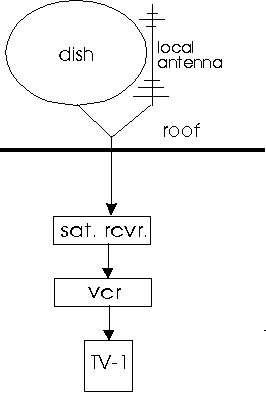
The simplest satellite hook-up consists of a small (18") dish located on your roof.
Most installers also attach an antenna to the dish for receiving local broadcasts, which you don't need if you qualify for local networks via satellite or get them from basic cable TV. (Update: apparently, installers no longer do this. If you order straight from Dish or DirectTV, they will send out an installer who probably will NOT install an external antenna. If, instead, you go to a local company who sells the satellite deals, they normally WILL offer the external antenna as an option.)
A coax cable runs from the dish to a satellite receiver (which is about the size of a VCR) sitting on your TV.
If you get cable TV, a coax cable is run from the street to your house and to a cable receiver by your TV.
Either way, a coax runs from the receiver to your TV. You change channels using the receiver's remote control; the TV remains on the same channel unless you want to look at local channels over a regular antenna.
The (old) diagram above shows a VCR. A more likely set-up will have a receiver with DVR built in hooked up directly to your TV. For surround sound, hook the audio output from the satellite or cable box to a receiver.
If you want to be able to see Pay-Per-View movies and/or some other features, you will also need a phone line running to the receiver.
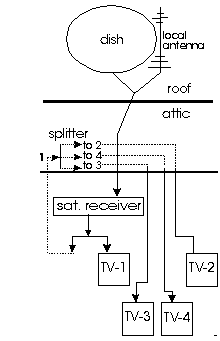
At a minimum, you need coax cables running from a "central distribution point" in the attic to each TV location in the house, in addition to the cable running to the receiver which is normally located at your primary viewing spot (e.g.: the living room).
When getting the cables run, consider having them run to your deck and even into the garage. (You might want to watch football while doing chores.)
This is important: The receiver's location has to have a minimum of two coax cables running to-from the central distribution point -- one to carry the dish signal to the receiver and one to carry the output from the receiver back up to the attic to distribute to each of the other TV locations.
If you are building a new house, be sure to have a phone connection at each TV location. It costs very little to do this during building, especially compared to having to run it later when the need arises. Not only is a phone line needed for ordering pay-per-view on dish, it offers another way to transmit pictures to other locations.
In the attic or garage, a coax splitter is put on the cable from the receiver and attached to the other side of the splitter are the cables going to all the other TVs in the house.
Now each TV will be able to see whatever comes out of the satellite receiver. But again, only the location with the receiver can change channels with this setup.
To turn the receiver on/off and change channels from other TV locations, you either have to buy an additional remote control for each location or carry the remote from room to room.
Some receivers have RF remotes which will work from anywhere in the house. Infrared remotes require line-of-sight between the remote and the receiver.
Dish Network's old receivers used infrared remotes, so we also had to buy a remote control signal sender for each TV location and a signal receiver unit for the main location.
We paid $55 for a signal receiver (which goes in the living room) and two senders -- one for the den and one for the master bedroom. These are the only three TVs we have at this time.
When we upgraded to a new DVR receiver, we found that it comes with an RF remote control, so in the evening when we are ready to retire from the living room to the bedroom, we can just carry the remote with us for controlling the dish receiver.
To summarize: the multi-TV set-up requires one dish, one receiver, at least one coax cable to each TV, one coax to the receiver, and (unless you get a receiver with an RF remote control) an extra remote for each location from which you want to be able to change channels, and a remote control signal receiver and a sender for each remote control location.
The problem with this setup is that unlike cable, every TV connected to the same satellite receiver has to watch the same show. Even though you may have a remote in the bedroom, it is changing the channel on the receiver in the living room, which changes the channel for everyone in the house.
Update: Any set-up using splitters may not work with HD. Other HD TVs will need their own receiver. They will also need their own cable running to the dish/antenna.
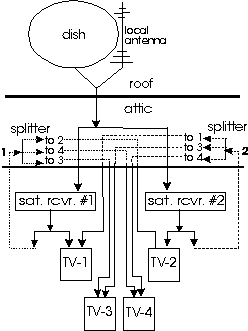
To help solve the problem of one person dictating the viewing for the entire house, you can get two receivers. This also requires a satellite dish which will support two receivers. Dish charges $5/month for each additional receiver. The 2007 HD DVR will let you view a different program on a TV in another room, but not in HD.
In Hot Springs Village, with most houses being 2-person homes, two receivers should be plenty.
Originally, we got two dish receivers -- one for the kitchen and one for the living room, with the master bedroom wired to the living room receiver. That way people in the den or kitchen could watch different channels than people in the living room (or master bedroom).
Dish Network has a HD-DVR-receiver which will allow a TV in another room to view a different station than the TV in the room with the receiver. However, you give up the ability to have picture-in-picture to do this.
At its simplest, hooking up TVs to two receivers is just like hooking up to one receiver, except that you have to pick which TVs to connect to which receiver, and you have to pick a location for the second receiver.
If you have a living room and a den, you may want a receiver in each of those rooms; otherwise, you may want to put one receiver in the living room and the second one in the master bedroom or maybe the second one in a study. You get the idea.
If you have more than two TVs, you have to decide which receiver to connect each one to, keeping in mind that every TV hooked to the same receiver has to watch the same channels.
Or not. Most new TVs have at least two video/audio inputs. If you had the foresight to run two coax cables to every TV location in the house from a central distribution point in the garage or attic, you can hook every TV up to both receivers using the two coax cables.
To do this, you need three coax cables running from the attic down to the two TV locations where the receivers are going to be -- one going to the receiver, one going from the receiver back to the attic, and one to the TV at that location from the other receiver. (A splitter on the cable coming out of the receiver lets you run a coax directly to the TV where the receiver is without having to go to and from the attic.)
With this setup, you can view either receiver on any TV which will let you change inputs. If your TV does not support multiple inputs, you can buy a coax cable A-B switch at Radio Shack and manually change which receiver you are viewing.
Although we now just have one satellite dish, we also have basic cable, so we are able to run both the dish signal and the cable signal to every TV. While the satellite signal is better (and has more channels than basic cable), having basic cable going to each TV gives each TV the option of watching a different channel.
The remote control situation gets more complicated if you want to be able to control both receivers from any location. In rooms with no receiver, you need two remote control signal senders -- one for each receiver if you want to be able to control them both. Then the senders have to be placed apart so that you don't send signals to both receivers at the same time.
In rooms with a receiver, you still need a remote signal sender for controlling the other receiver. However, you do not need a second remote, since the remotes use the same signals. However, this means that the sender has to be located away from the receiver so that you do not change both receivers at once.
This is probably a lot more complicated than most people need. In our house, we have a receiver in the living room and one in the den, and a TV in the bedroom which gets the living room's receiver. We have TV wiring going into the guest bedrooms, the kitchen, and the deck, but we are not using them at this time.
The TV in the living room also gets the picture from the den's receiver, but we didn't bother to get a remote signal sender for the den's receiver. The idea is that while Kay is watching some "girl movie", Nelson can be watching sports on the picture-in-a-picture feed from the other room, so a lot of channel changing is not needed.
However, in the den, we did get a remote signal sender. The reason for this is primarily because we signed up for WebTV Internet access on the living room receiver and this does not carry over to the second receiver.
But with the remote sender, we can switch the den's TV over to the living room's receiver and using the remote signal sender access the Internet as if we were in the living room.
We also have a remote signal sender in the master bedroom. We just carry the remote control from the living room into the bedroom at night, so we did not buy one just for the bedroom.
UPDATE:
Basic analog cable does not require a cable box. Each TV can tune in the cable stations by changing TV channels.
Since the new DVR receiver uses RF instead of infrared, it can be carried from room-to-room without all the complicated IR signal senders.
If you get two dish receivers, each with RF controls, all you have to do is set them to different frequencies to keep each remote from changing channels on the other receiver.
If you have a DVD player or a laser disc player or a VCR in your living room, you may want to be able to see them on TVs in other rooms.
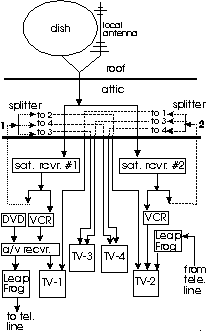
We got a device called "Leap Frog" which sends the picture over existing home telephone lines to Leap Frog receivers in other rooms. This is a simple and effective way to share devices.
What you share depends on where you hook up the Leap Frog transmitter. If you hook it up directly to a DVD player, the other TVs can only get the DVD player. But if you have an audio/video receiver in your main TV room with, say, a DVD, a VCR and a satellite receiver all going into it, you can transmit the output from the a/v receiver instead of from the DVD player.
The advantage is that other TVs can see anything that the main TV can see, including the satellite receiver (which means that the other coax up to the attic is not needed -- see diagram above). The disadvantage is that the other TVs can see only what the main TV is seeing.
But if you hook up the Leap Frog to the DVD player, another TV can be watching a DVD while the main TV is watching something else.
2007 Update: Leap Frog may (probably) does not work with HD -- I haven't tried it, but that would be my guess. A product named SlingBox does work with HD, but it pretty pricey.
If you feel like both of these arrangements are unacceptable, you need a more sophisticated method of sharing video sources -- a video modulation and distribution ("VMD") system to go in your garage or attic. (Our builder put a tangle of cables in the attic as a "distribution point". Not only are the cables a mess, but the attic is pretty hot in the summer. Judy's builder ran all the cable and phone lines to a box in the garage - much neater and easier to get to.)
With VMD, you can view can view any video source in the house: any satellite receiver, local TV antenna, VCR, DVD player, closed circuit TV camera, etc.
These video sources are modulated to certain TV channels (e.g.: 90, 91, 92, etc.). Then at any TV you just turn the TV to the desired channel to see whichever source is assigned to that channel.
However, this does not solve the problem of controlling the video sources. For example, if you were watching a DVD and wanted to pause it to answer the phone, you would either have to run to the other room or buy another remote video sender and receiver and another DVD remote control (if that is even possible).
In addition to the cost of the extra remote control devices, this setup also requires a modulator box which costs about $400, plus another $400 or more for installation. For $800, you can probably buy both a second DVD player andVCR for your secondary viewing location.
You also need a coax cable for each device to be shared. For example, if you have a DVD and VCR in the living room, in addition to the satellite receiver, you have to run a total of 5 cables -- one to the satellite receiver from the dish, and one to the a/v receiver from the distribution point (to get all the video devices at other locations) and one for each of the devices to be shared: the satellite receiver, the DVD player, and the VCR.
The electrician can also run speaker wires out to your deck or in any room in which you will want surround sound speakers. If you want the electrician to use anything more sophisticated than electric cord for speaker wire, be sure to specify it in the building contract.
The electrican at Judy's house ran some kind of thin (probably no more than 26-28 gauge) intercom wire rather than using the minimum 16-gauge speakers require (with wire, smaller numbers are thicker and thus better), and stapled it to the studs, which means it cannot be easily changed.. So you may be better off buying and providing the speaker wire yourself than trying to fix something like this later.
I had some really big stereo speakers, but the boss of the family did not want them in the living room, so I listened to small surround sound speakers at Circuit City and got a set (2 front, a center, and 2 rear) of speakers for about $200.
My big subwoofer (which costs several times more than the other 5 speakers combined) got special dispensation and was allowed to remain hidden in the living room. The sound is great, so apparently it is possible to economize on the small speakers if you have a good subwoofer.
In the other rooms, we just used stereo speakers since we will not be sitting in one place watching TV or listening to music. In fact, when we upgraded the den TV to HD, we got one with speakers built in and do not have an external receiver nor speakers for it.
We didn't get speaker wiring out to the deck, since we would not want to be annoying people on the golf course with loud music anyway. We will just carry a portable radio/CD player out to the deck when needed.
The electrician can also run intercom wire for you if you feel like your house is large enough to need an intercom. We felt that in a fairly open, one-story house, we could do without an intercom. Some people like stereo speakers all over the house for listening to music. We didn't do that, so talk to your electrician.
Speaker Plugs
Where wires come out of walls, the electrician should put wall plates with appropriate connectors. Our electrician did this for some, but not all, coax outlets, but not for speaker wire outlets. Instead, we have strands of coax and speaker wire just hanging out of the wall without even a plate covering the opening.
If you have surround sound speaker wire in the walls, specify that they should terminate on a wall plate where you can plug in either RCA or "phono" plugs or wire-wrap posts. A picture of what you want may help, but at least specify the number of posts you want at two per speaker.